什么是 Language Server Protocol(LSP)?
- Language Server Protocol 定义了一套标准化协议,用于文本编辑器或 IDE(客户端)与编程语言(服务端)之间的通信。
- 该协议基于 JSONRPC。
- 客户端(文本编辑器)可以借此实现
- 跳转到定义
- 错误与警告提示
- 自动补全
- …
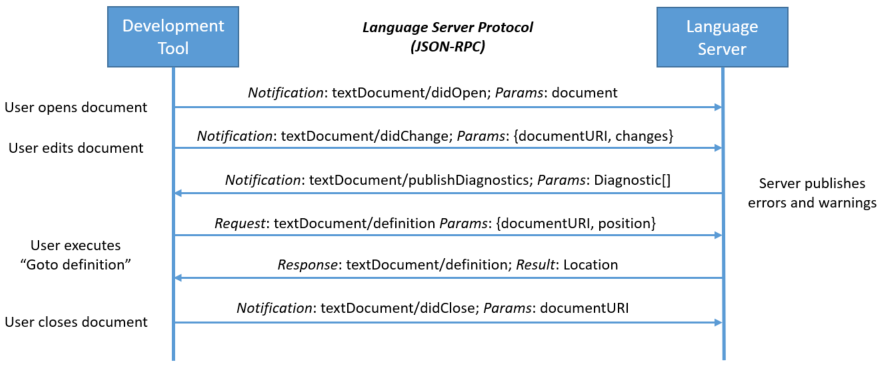
https://microsoft.github.io/language-server-protocol/overviews/lsp/overview/
- 解决了 m 乘 n 的组合复杂度问题

什么是 Sourcekit-LSP?

- Apple 基于
sourcekitd和clangd实现的 LSP sourcekitd是一个提供 IDE 功能的框架clangd是面向 C 系语言(C/C++/ObjC)的语言服务器- 仅支持 Swift Package Manager 项目
从 Xcode 11.4 开始,SourceKit-LSP 已作为内置工具随 Xcode 一起提供。
/Applications/Xcode.app/Contents/Developer/Toolchains/XcodeDefault.xctoolchain/usr/bin/sourcekit-lsp
Xcode and the corresponding Command Line Tools package include the SourceKit-LSP language server for Swift and C-based languages. The language server is in early development, and this is a great time to experiment with it. SourceKit-LSP can be used with third-party tools that support the Language Server Protocol (LSP), and it supports Swift Packages built from the command-line. For information about using SourceKit-LSP see Getting Started with SourceKit-LSP. (48004600)
https://developer.apple.com/documentation/xcode_release_notes/xcode_11_4_release_notes
VSCode 集成
https://github.com/apple/sourcekit-lsp/tree/master/Editors/vscode
$ cd Editors/vscode
$ npm run createDevPackage
$ code --install-extension out/sourcekit-lsp-vscode-dev.vsix
- VSCode 扩展尚未发布到扩展市场。
- 你需要自己动手构建。
- 也可以尝试其他替代方案,但集成起来会更复杂
小结
LSP 能把文本编辑器变成 IDE。
不妨试试在下面这些编辑器里写 Swift:
- VSCode(推荐)
- Sublime Text
- Vim
- Emacs
- …