Language Server Protocol(LSP) とは?
- Language Server Protocol は、テキストエディタや IDE(クライアント)と言語(サーバー)が通信するための標準化されたプロトコルを定義するものです。
- プロトコルは JSONRPC をベースにしています。
- クライアント(テキストエディタ)側では、次のような機能を実装できます。
- 定義へジャンプ
- エラーと警告の表示
- 自動補完
- …
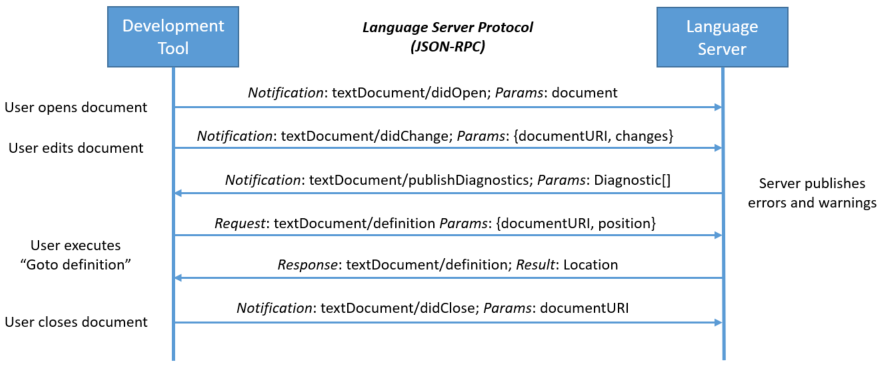
https://microsoft.github.io/language-server-protocol/overviews/lsp/overview/
- m×n の組み合わせ爆発の問題を解決してくれます

Sourcekit-LSP とは?

sourcekitdとclangdの上に構築された、Apple による LSP 実装ですsourcekitdは IDE 向けの機能を提供するフレームワークですclangdは C 系言語(C/C++/ObjC)のランゲージサーバーです- Swift Package Manager のプロジェクトのみをサポートしています
Xcode 11.4 以降、SourceKit-LSP はビルトインツールとして同梱されています。
/Applications/Xcode.app/Contents/Developer/Toolchains/XcodeDefault.xctoolchain/usr/bin/sourcekit-lsp
Xcode and the corresponding Command Line Tools package include the SourceKit-LSP language server for Swift and C-based languages. The language server is in early development, and this is a great time to experiment with it. SourceKit-LSP can be used with third-party tools that support the Language Server Protocol (LSP), and it supports Swift Packages built from the command-line. For information about using SourceKit-LSP see Getting Started with SourceKit-LSP. (48004600)
https://developer.apple.com/documentation/xcode_release_notes/xcode_11_4_release_notes
VSCode との連携
https://github.com/apple/sourcekit-lsp/tree/master/Editors/vscode
$ cd Editors/vscode
$ npm run createDevPackage
$ code --install-extension out/sourcekit-lsp-vscode-dev.vsix
- VSCode 拡張はまだマーケットプレイスでは公開されていません。
- 自分でビルドする必要があります。
- 代替の拡張もありますが、より込み入ったセットアップが必要になります
まとめ
LSP はテキストエディタを IDE に変えてくれます。
ぜひ次のエディタで Swift を書いてみてください。
- VSCode(おすすめ)
- Sublime Text
- Vim
- Emacs
- …