Was ist das Language Server Protocol (LSP)?
- Das Language Server Protocol definiert ein standardisiertes Protokoll, über das ein Texteditor bzw. eine IDE (Client) mit einer Sprache (Server) kommuniziert.
- Das Protokoll basiert auf JSONRPC.
- Ein Client (Texteditor) kann damit Features umsetzen wie
- Go to Definition
- Fehler und Warnungen
- Autovervollständigung
- …
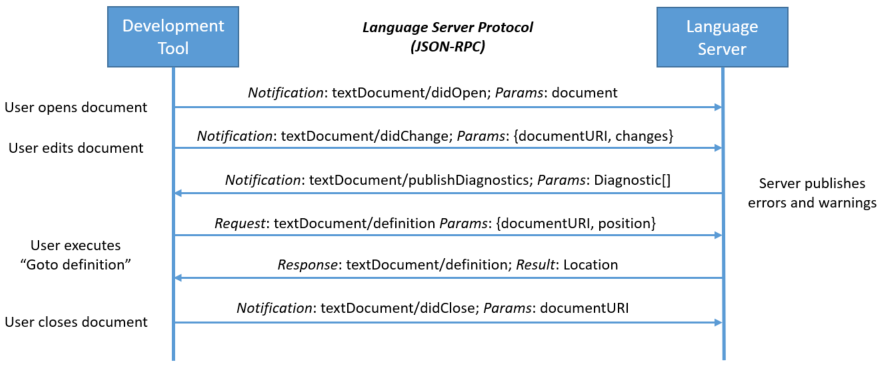
https://microsoft.github.io/language-server-protocol/overviews/lsp/overview/
- Löst das m-mal-n-Komplexitätsproblem

Was ist Sourcekit-LSP?

- Apples LSP-Implementierung auf Basis von
sourcekitdundclangd sourcekitdist ein Framework, das IDE-Features bereitstelltclangdist der Language Server für die C-Sprachfamilie (C/C++/ObjC)- unterstützt ausschließlich Swift-Package-Manager-Projekte
Seit Xcode 11.4 ist SourceKit-LSP als Tool direkt mit dabei.
/Applications/Xcode.app/Contents/Developer/Toolchains/XcodeDefault.xctoolchain/usr/bin/sourcekit-lsp
Xcode and the corresponding Command Line Tools package include the SourceKit-LSP language server for Swift and C-based languages. The language server is in early development, and this is a great time to experiment with it. SourceKit-LSP can be used with third-party tools that support the Language Server Protocol (LSP), and it supports Swift Packages built from the command-line. For information about using SourceKit-LSP see Getting Started with SourceKit-LSP. (48004600)
https://developer.apple.com/documentation/xcode_release_notes/xcode_11_4_release_notes
VSCode-Integration
https://github.com/apple/sourcekit-lsp/tree/master/Editors/vscode
$ cd Editors/vscode
$ npm run createDevPackage
$ code --install-extension out/sourcekit-lsp-vscode-dev.vsix
- Die VSCode-Extension ist noch nicht im Marketplace veröffentlicht.
- Man muss sie selbst bauen.
- Es gibt Alternativen, die aber eine aufwendigere Integration erfordern
Fazit
LSP verwandelt einen Texteditor in eine IDE.
Probiert doch mal, Swift zu schreiben in
- VSCode (empfohlen)
- Sublime Text
- Vim
- Emacs
- …